Posts

Postman Echo - An Easy Way to debug the Postman Requests

Image
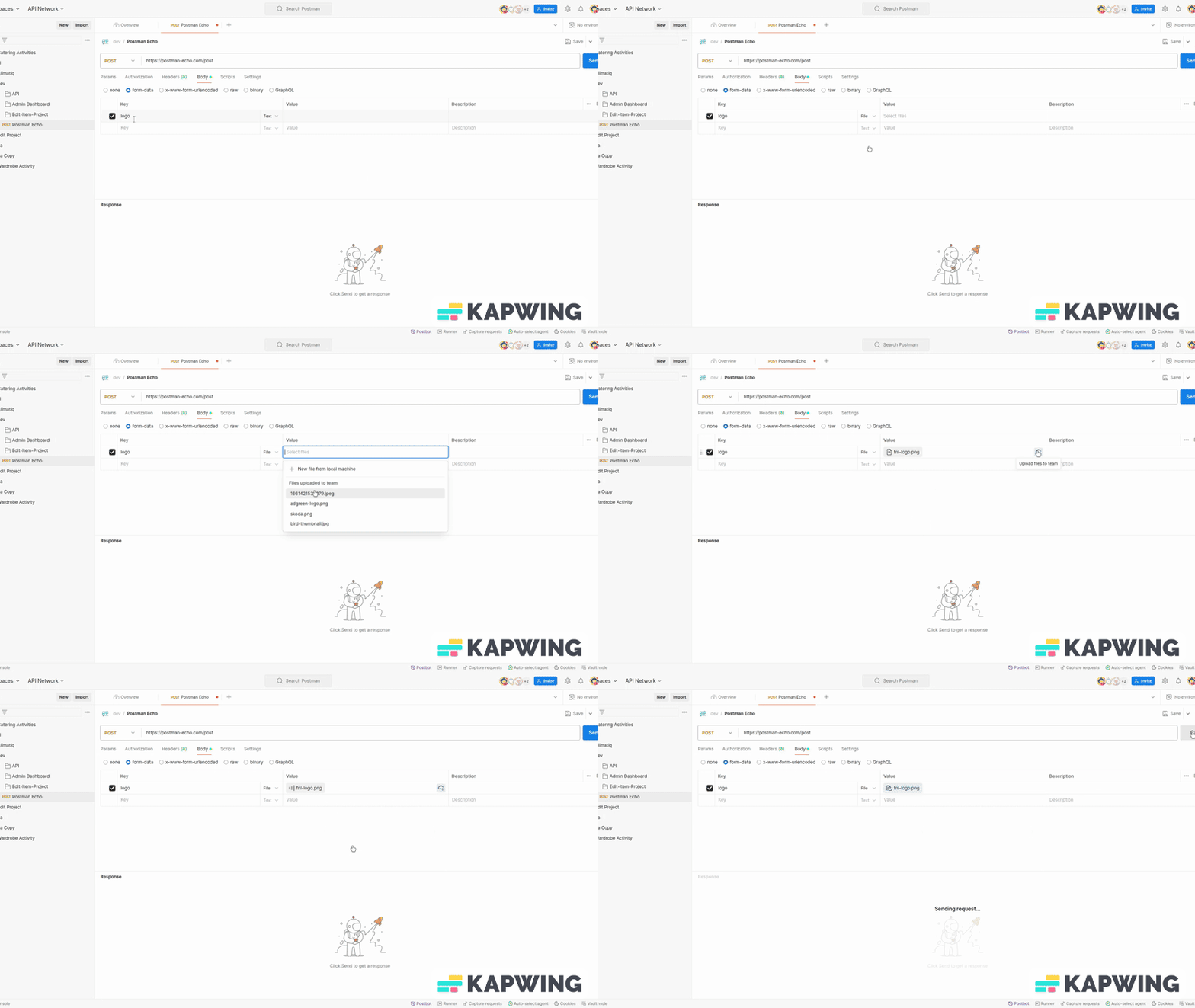
While Testing APIs, sometimes we have a situation when we want to debug/know how my input payload goes to the server. I had a similar situation when I was testing a file uploading API using Postman cloud storage files, but on CircleCi it was returning an error with the message - file path not found. So I have to find what input payload it actually sends at that very moment. Here comes to save me - Postman Echo API. Postman Eco API is a public API endpoint with POST method. As its name states, it just returns the input payload you send in the response. So That you can validate, what file path or input value actually sent in the request from the postman. POST   https://postman-echo.com/post So, I found this cool feature really helpful. You don't need to go to other tool or application to debug and check the input payload. You can easily do it using Postman Echo. Hope it will also help you. Let me know your experience with it in comments,  once you use this.

Using Postman Cloud - Test Data Storage for file uploading APIs Collection Run

Image
Last year in Dec. Postman has announced Test Data file storage facility to make file uploading API testing much simpler and share those files among the team, so everyone can directly use them from the cloud storage of Postman without configuring Working directory and placing the files inside it. In case you want to know about the older way, I have already explain older way in last post  . For using Postman shared cloud storage for uploading files and sharing among the team, Please make sure you are using the latest version of Postman desktop application. Similarly, make sure you are using latest version of Postman CLI in-case you are testing file uploading APIs using Postman CLI collection run command. Let's understand now, how we can use this cool new feature of Postman Cloud File Storage, sharing among the team members and using it during the API testing. One can upload a file to Postman File storage Using Postman API request Body - form data To upload files to the Postman c...

Postman Collection Run - How to Test File Uploading API on CircleCi or Jenkins

Image
From last couple of days,  I was doing R&D on how we can test file uploading API on CircleCi or Postman collection Run? Finally, I found a way to test the File uploading APIs using the Postman Desktop app  OR Postman CLI collection run. I have also tested this solution, even on CircleCi for running the automated testing postman APIs by Postman CLI collection run. Here is step by step process, how you can test the file uploading API on CircleCi or Postman collection Run? Local Desktop App settings: Open and go to Local Postman app settings -> General Set working directly location  ( default is postman installation directory but can also choose any other directory ) Place files (to use in file upload APIs during the collection run) in the working directory selected as in the above step and also in the root directory of your project. Now go to the API in which you need to upload a file, and select the file from the working directory selected in step 2. Save that ...

How to Build Nested Tree Structures for Parent-Child using The Laravel Eloquent Relationships

A few days back, working on a Laravel project I had to create an API returning the deeply nested Tree structure for the parent-child relationship of a given object entity - in this case, a Company. Although as an experienced PHP developer, I know how to build Nested Tree Structures for Parent-Child relationships using core PHP and SQL queries. But I was looking to, if Laravel Eloquent provides any efficient inbuilt method to fetch the Parent-child relationship with a deep nested tree structure. This led me to search on ChatGPT for the same. Here I want to give credit to ChatGPT which not only saved my time but also suggested a new way to get the desired result using Laravel Eloquent Relationships. Before I explain the solution for building a Nested Tree Structure, first let's understand it. Understanding Nested Tree Structures: A nested tree structure organizes data in a hierarchical manner, making it easy to represent parent-child relationships. Each node in the tree can have mult...

Challenges and Solutions: Deploying Thoughtworks Tech Radar Node.js + Webpack on Heroku.

A few days back, I got a chance to deploy Thoughtworks Tech Radar  (a Node.js package) on Heroku as our own organization Tech Radar. Although Deploying a Node.js application with Webpack on Heroku can be an easy process, still you may face certain challenges while deploying. Here's a brief rundown of the challenges I have faced and how I tackled them during the deployment process. 1. Missing Procfile One of the initial challenges I faced was forgetting to include a Procfile in my project's root directory. This resulted in Heroku not knowing how to start my application as Heroku uses a Procfile to determine how to run your application. Know more about Procfile To resolve this, I created a simple Procfile that specifies the below command to run my Node.js server. ``` web: npm install --include=dev && npm run dev ``` 2. Heroku-prebuild - command Webpack is commonly used to bundle and optimize JavaScript code for production. However, after the build process, I realized that...

Helping others costs nothing But your selfish nature.

Helping others costs nothing,  But your selfish nature. When things are for others only then we can see others' needs and the difficulties they are facing. Helping others need courage and time to help as well, which ultimately cuts time for ourselves. Being selfish we can't do all this.

Install Docker Desktop on Ubuntu 22.04 LTS

Install Docker Desktop on Ubuntu Prerequisites For non-Gnome Desktop environments, gnome terminal must be installed:      $ sudo apt install gnome-terminal Set up the repository 1. Update the apt package index and install packages to allow apt to use a repository over HTTPS: $ sudo apt-get update $ sudo apt-get install ca-certificates curl gnupg lsb-release 2. Add Docker’s official GPG key: $ sudo mkdir -p /etc/apt/keyrings $ curl -fsSL https://download.docker.com/linux/ubuntu/gpg | sudo gpg --dearmor -o /etc/apt/keyrings/docker.gpg 3. Use the following command to set up the repository: $ echo \    "deb [arch=$(dpkg --print-architecture) signed-by=/etc/apt/keyrings/docker.gpg] https://download.docker.com/linux/ubuntu \ $(lsb_release -cs) stable" | sudo tee /etc/apt/sources.list.d/docker.list > /dev/null...

Solution for Screen Sharing not working on Ubuntu 22.04

Recently, I upgraded my system OS from ubuntu 20.04 LTS to 22.04 LTS which I have been waiting for a long-time. It seems all goes well until I faced issues while sharing my screen over MEET or ZOOM meetings. I searched for solutions and found most of the solutions on Stackoverflow suggesting to disable the Wayland display feature and working with X11 which was used in earlier versions of Ubuntu OS. But disabling the Wayland UI scheme is not the correct solution,  because will slow down the system because the Wayland display feature is very fast in performance as compared to Xorg X11. Moreover, the Wayland display feature is more secure than Xorg X11 while providing access to the system. Actually, it is not a problem with Ubuntu OS itself. It is problem with the browser hasn't developed a feature compatible with Wayland security protocols. If anyone is facing problems with screen sharing because of OS upgraded to ubuntu 22.04, Here is the solution (without disabling the Wayla...

Laravel Middleware - Block IPs using Middleware class

When talking about securing the Laravel application, we might also want to restrict IP address to access our application, especially when we have Laravel setup as a Backend server providing data through APIs or web services. As of today, you might find no. of Laravel package providing IP address restriction functionality but I found it does not make any sense to install a package when it is achieved through only One class.  Yes! we can just do this with a simple middleware class.  Let me explain to you little details on how we can achieve it using the Middleware class. First, let's create a middleware class using the Laravel artisan command: php artisan make:middleware RestrictIPAddress It will create a new class in your Laravel project under the ` app/Http/Middleware ` directory. It will have a default empty method handle(), where you have to write your logic. Logic is simple, you just have to get the IP address from where the request is coming. here is the method...

4 Essential of relationships - Trust, Honesty, Loyalty, Forgiveness

This is something I experienced and observed in my life till that time. I strongly believe - Trust, Honesty, Loyalty and Forgiveness are essential 4 elements that strengthen the relationship. How? let me explain. Trust Trust is a very essential element of any relationship we build. A relationship can't go long without trust.  When you trust your partner or one you are in relation with, it makes you overlook or avoid the things that others used to say about them.  You never fall into distrust easily by listening to others. Honesty If you are honest with your partner or someone you are in a relationship with, you must always tell truth about whatever happens in the relationship. Even if something wrong happens un-intentionally and we speak upon truth honestly, most of the time front person forgives us for knowing the truth and our honesty about the relationship. Loyalty If you are loyal to your partner or someone you are in a relationship with, you must not do anything wron...

Parents - They Learnt to adopt their-self better than us

Our Parents in old age learn to adopt changes in life faster than us. Still, we thought they are rigid and old thoughts people. In modern times we are more intelligent to understand the situation and time changes. But actually, we are not. It's a kind of myth. Our old parents are more intelligent to understand the changes in life.  Most of the time I saw our parent silently accepts the change even if it doesn't suit them, because they have seen the world evolving, and new thing happenings more than we have seen in our life.  And they know either way they have to accept it (change) to keep going on with the world. On other hand, we found difficult to adopt a change most of the time and we keep ourselves to be the same as we are.

What is Papertrail? Uses and Advantages

Papertrail is basically a log management tool used for catching Heroku systems and build but not limited to. It has been useful because on Heroku we can check live logs and can't check logs for the previous requests except for logs for the deployment process. So below are some of the key features which paper trail providing us: Recording the system logs live and we can also look into the logs of the past (from n no. of days up to a year) based on the plan we choose. It allows searching past logs by date-time, string or regex. It also allows us to configure alerts (emails, Slack) for a specific type of request failure response like time-out, system error or even request taking time more than a particular limit. It allows us to set filters for logs to save or not to save. Some advantages we seek from Papertrail are: Heroku adon is available with one-click installation like other adon. Fast and easy search interface. Able to store long time period logs history (up to 1 year) Custom al...

How to Upgrade or Downgrade Heroku Postgres adon plan

Image
If you are using Heroku and Postgres adon in your project, by the time you may want to upgrade or downgrade Heroku Postgres adon plan based upon your project's database size decrease or increase with time. Although you can follow Heroku documentation for the purpose: Changing the Plan or Infrastructure of a Heroku Postgres Database But I wish to introduce you to another way to upgrade or downgrade the Heroku PostgreSQL Database adon plan. In this process we have 3 steps to follow: 1. Add additional Heroku Postgres adon with the desired plan (you want to switch) using the below command:      heroku addons:create heroku-postgresql:adon-plan --app your-appname Where `adon-plan` can be replaced with the desired plan from the plan list and `your-appname` with your application name. 2. Now copy your database from the old Postgres adon to the newly added Postgres adon.           heroku pg:copy HEROKU_POSTGRESQL_MAUVE_URL HEROKU_POSTGRESQL_PINK_URL ...

Differences between json and jsonb - JSON data type in PostgreSQL

You may have read differences between PostgreSQL datatypes JSON and JSONB. If not, let see the difference between both theoretically and practically. Although, both json and jsonb are types of PostgreSQL JSON datatypes and accepts almost same format as input values i.e. json. But still there are some difference which one must know to efficiently use or can choose from both json and jsonb.  The main different is how they actually store data; the json data type stores input value as it is but  jsonb stores value in a decomposed binary format which lead to difference in  efficiency .  Jsonb is slower as compare to json while saving the input values because of converting json values to binary format before saving. Jsonb fast in processing the data because no re-parsing needed as compare to json datatype which needs processing function to re-parsing on every execution. Few other differences between json and jsonb are: Jsonb supports indexing which is advantage over j...

Laravel Validation - Unique rule with multiple column and condition.

Today I am going to share, How we can use Laravel validation rule `unique`. If you have worked with laravel and familiar with laravel validation, you must know what does 'unique' rule checks. If not let me give here a brief about this. In simple words, It is similar to a unique key constraint applied to a column in the database table. 'Unique' rule check there is no similar value exists in the given database table column, to value matching with the provided input value. The general format of the rule is: unique:table //when input name is similar to column name OR unique:table,column OR unique:Model,attribute Examples: 'email' => 'unique:users' //here users is table name OR 'email' => 'unique:c,email_address' //can give custom column name. OR 'email' => 'unique:User,email'  //here User is a model class This is a very simple usage ...

Get Free SSL Certificate from Let’s Encrypt for your website - Linux, Apache, EC2, Heroku.

Image
To enable HTTPS on your website, you need a certificate from a Certificate Authority (CA). Let’s Encrypt is a nonprofit Certificate Authority providing Free SSL certificates to 225 million websites.  You can also get a (absolutely) free SSL certificate using Certbot. Certbot is open-source software tool recommended by Let's Encrypt to for automatically deploy SSL certificate. This certificate is as valid as a paid certificate. There are two ways to get and install certificate on your server. 1. When you have SSH access to your server. Then you have option to Generate and Deploy SSL certificate automatically by installing Certbot on your server. 2. When you are using a platform like Heroku (Paas) where you don't have SSH access to your server directly and can't install any package on it. In this case you can install Certbot at your local system (Linux) using below commands and use it only to generate certificate files. Later you can Deploy them manually. Install Certbot a...

LEAST() and GREATEST() - Postgres SQL Amazing But Rarely Known Functions .

PostgresSQL is very powerful and one of the world's most advanced open-source relational databases. It gives much more flexibility and customization on query level when you want to perform a complex operation or complex queries on the database. Postgresql provides multiple operators and functions which make even complex operations and complex queries pretty easy and simple. Similarly LEAST() and GREATEST() are functions that make your work very easy and simple. LEAST() and GREATEST() functions are very useful when you want to operate on different columns within the same row (a record) in a table. LEAST() and GREATEST() compare and find the minimum and maximum value respectively among given columns values in the same row. It's similar to finding a minimum or maximum value from an array of given values. Here are a few simple examples you can try: select LEAST(5, 3, 9, 2, 8, 1) and GREATEST(5, 3, 9, 2, 8, 1); //should give 1 and 9 respectively In-case of String or Varchar, it gi...

How to Apply SSL Certificate (non-self) on EC2 with Linux/Ubuntu having Apache Server.

Assuming you are well aware of What is an SSL certificate? Why we need it? here I am going to guide you for How you can apply an SSL certificate for your website hosted on Linux or Ubuntu Server using Apache 2 server. You can either purchase a new SSL certificate or can generate it for free on  sslforfree.com  which authorized by  Letsencrypt  the first non-profit CA. After Purchasing or getting your SSL certificate you have actually 2 SSL files, Certificate and Private Key. You can upload both SSL files (certificate.crt and private.key) on the server: Create a new folder in Directory `/home/user-name/.ssh`. Create or upload files certificate (.cert) file as certificate.crt and Private key (.key) as private.key in the folder created earlier. Now edit Virtual Host configuration for the website for which you want to apply the SSL certificate. sudo nano /etc/apache2/sites-enabled/{yourwebsitedomain.com}.conf Add the following code to website vhost config...

How to Block Inspect Element and Right Click on Your Website using Simple JavaScript

Assuming you are well aware of What is an SSL certificate? Why we need it? here I am going to guide you for How you can apply an SSL certificate for your website hosted on Linux or Ubuntu Server using Apache 2 server. You can either purchase a new SSL certificate or can generate it for free on  sslforfree.com  which authorized by  Letsencrypt  the first non-profit CA. After Purchasing or getting your SSL certificate you have actually 2 SSL files, Certificate and Private Key. You can upload both SSL files (certificate.crt and private.key) on the server: Create a new folder in Directory `/home/user-name/.ssh`. Create or upload files certificate (.cert) file as certificate.crt and Private key (.key) as private.key in the folder created earlier. Now edit Virtual Host configuration for the website for which you want to apply the SSL certificate. sudo nano /etc/apache2/sites-enabled/{yourwebsitedomain....

How to Lead - All You Need to Know to be A Good Leader

Image
There is no specific field/domain (development, marketing, management, etc.) to become a leader and you don't need to wait for an opportunity for the same. Leadership can be observed in any field/domain in any small or big tasks. But there are few observations of a good leader. Observations on Leadership 1. No Single type of personality for leadership : The is not any particular type of person who is only able to lead. Anyone can become a good leader no matter what kind of personality you have. You do not need to look like or copy anyone great leader, just be yourself. 2. Three Fundamental Attributes :       -  Great leader thinks and communicate clearly : Simple and clear communication actually needs your thought process and time. Take some spare time, write down your thoughts then think about how to make them more simple and clear to communicate.       It always pays you back to communicate clearly.       -  Good Judge...